My Steam and EOS research: a reported and patched information-exposure issue, with a conceptual C# exchange, client-ID authorization checks, and post-patch HTTP 403 responses.
Two successive mod-validation bypasses in ARK: Survival Ascended, both since patched. A C# proxy, traffic captures, and the client-side trust assumptions behind the investigation.
Access automation and security engineering for a community application. An architectural project report covering identity, workflows, data integrity, and operations.
October 2023 – August 2025Founder | Systems Administration and Application SecurityLegioner Solutions | Boca Raton, FL
Hours per week: Approx. 35–40 | Series/Grade: N/A (private sector)
Performed systems administration across production servers and multiple nodes supporting 20,000+ active users; managed server configurations, application deployments, maintenance, and technical troubleshooting.
Engineered API integrations and real‐time data pipelines using MongoDB, JSON, and the Google Sheets API; managed server logs and user requests, resolved data integrity issues, and maintained technical documentation.
Automated Identity and Access Management (IAM) and role‐based access control (RBAC) workflows, reducing administrative overhead by 70% while improving user verification and account administration.
Led a distributed team of contributors, established technical priorities, and coordinated feature development, bug fixes, and release schedules across time zones.
Monitored servers and multiple nodes through log review, error tracking, and availability checks; maintained 99.9% uptime by investigating service disruptions, resolving faults, and restoring reliable operations.
Developed React dashboards deployed through Railway and Vercel to centralize server activity and operational data, enabling nontechnical stakeholders to monitor production environments and player engagement.
Integrated Epic Online Services (EOS) and Steam APIs for authenticated server and player data; assessed undocumented authentication behavior through controlled testing and documented observed security risks.
Managed a $300 monthly infrastructure budget and maintained regular communication with users and contributors to address technical needs and support reliable service delivery.
Conducted black‐box analysis of client‐server communications; analyzed outbound network traffic, DNS behavior, telemetry, and host‐level traffic controls to assess application behavior and authentication risks.
Assessed EOS and Steam authentication workflows using public documentation, controlled testing, and direct observation to identify weaknesses in identity verification and third‐party service interactions.
Discovered and documented an authentication‐related information exposure vulnerability involving player and server data in EOS/Steam workflows; responsibly disclosed the findings to Studio Wildcard.
Developed a custom Unreal Engine 5 mod using Blueprint scripting; examined client‐side architecture and command execution behavior to support application security testing and vulnerability assessment.
Identified and documented an access control bypass that allowed unauthenticated users to load unapproved mods onto official multiplayer servers, circumventing restrictions on unauthorized content.
Responsibly disclosed the vulnerability to Studio Wildcard, documenting the observed behavior and potential security impact to support remediation and reduce the risk of unauthorized server content.
Technical capabilities
Education
Expected spring 2027
B.S. Data Science and Analytics
Florida Atlantic University
GPA 3.80 / 4.00 · Dean’s List, Spring 2026
December 2024
A.S. Computer Programming
Palm Beach State College
GPA 3.50 / 4.00
Certifications & development
CompTIA SecurityX (formerly CASP+) Certification
Earned September 2026
Cisco Certified Network Associate (CCNA)
In progress
Microsoft Certified: Azure Administrator Associate (AZ-104)
In progress
LinkedIn Windows 11: Configure and Support Core Services Certification
Earned September 2026
LinkedIn Windows 11: Administration Certification
Earned September 2026
Global Career Accelerator Data Analysis Certification
Earned July 2026
Global Career Accelerator Data Visualization Certification
Earned July 2026
Global Career Accelerator Intercultural Skills Certification
Earned July 2026
Global Career Accelerator AI Professional Skills Certification
Earned July 2026
Lexington Park, Maryland · Open to remoteEnglish / Spanish · U.S. citizen · Clearance eligible; no active clearanceLinkedIn
I built and maintained Legioner Solutions to make community administration easier to manage. I replaced free-form requests and manual follow-ups with guided forms, a staff work queue, saved records, and completion notifications.
My role: Application development, service integrations, deployment, and systems administration using Node.js, MongoDB, and Discord.
Why it mattered: Users could submit requests consistently, and staff could see what needed attention and track it through completion.
Outcome: The application supported a community of 20,000+ members, with an estimated 70% reduction in manual administration across automated activities. Staff retained approval and fulfillment decisions.
Technical report
20,000+Community members
Membership-based scale, not a concurrent-user or throughput measurement.
~70%Less manual administration
Project-reported estimate across automated activities.
The workflow at a glance
The application coordinates the request. Staff make the decision and complete the fulfillment.
01 → 04 From request to completion
User inputSubmit a guided requestCommands and forms collect details. Selected handlers check roles, membership, or pending state.
Application stateRecord & queue the workA request is stored in MongoDB and presented to staff as a work card.
Human decisionReview & fulfillStaff approve applicable requests and carry out the in-game fulfillment.
CompletionUpdate & notifyRecord completion, refresh the queue, disable completed controls, and notify the requester.
Supporting integrations
External trackers → operational displaysConfigured source filtering, parsed telemetry, server status, and scheduled updates.
Google Sheets ↔ application recordsService-account import/export utilities and safeguards for manually corrected data.
A simplified view of the documented request lifecycle. Authorization is distributed across selected handlers; not every workflow follows an identical sequence.
The operational problem
Membership approvals, access requests, and resource fulfillment involved recurring coordination between users and staff. Free-form intake made the status of outstanding work harder to follow. I replaced that intake with guided inputs, persistent requests, staff-facing queues, and completion notifications.
The system needed to connect several kinds of information: platform identity, configured community roles, request details, stored records, and external server telemetry. Each integration had a different purpose and needed to be handled within its own trust boundary.
What I built
Identity and access workflows
The platform supplied an authenticated actor and interaction context. Selected commands checked configured role groups before modifying membership state. Cross-community onboarding checked primary-community membership and the required role before assigning secondary roles.
Requests, staff queues, and notifications
Commands, buttons, and forms routed interactions to the relevant application handler. Applicable request workflows checked for an existing pending request, created an incomplete MongoDB record, and published a staff work card. After fulfillment, the application updated completion state and coordinated the queue and requester notifications.
Telemetry and external services
Configured tracker messages passed through sender and channel matching before being parsed into operational state. A public server feed supplied population and metadata for scheduled displays. External database reads supported player analytics and leaderboard aggregation.
Data and administrative integrations
MongoDB held member approvals, requests, and completion state. Google Sheets connected through a service account and import/export utilities. Local JSON stored tasks, timers, and snapshots; in-memory maps and sets held temporary state.
Engineering decisions and safeguards
I separated workflow coordination from human fulfillment. The application made work visible and tracked its state, while staff retained responsibility for decisions that required their review.
Typed command options, required form inputs, duplicate-pending-request checks, private responses in selected workflows, and configured telemetry-source matching supported more predictable operations. Persisted reminders restored scheduled work after application restarts.
Character-record removals used a process-local mutex to serialize a helper’s read/modify/write path. Records included a lastModified marker, and spreadsheet imports skipped retained records already marked as manually corrected. RAW spreadsheet writes helped preserve the intended input values.
Explore the technical implementation
The detailed diagram below connects the access workflow with telemetry, storage, and integrations. Open it to inspect the architecture, then select a node for an illustrative code example.
Architecture & illustrative codeAccess workflows, telemetry, storage, and integration boundaries03
Technical architecture & data flow
Identity context moves through event routing, handler-specific checks, persistent workflow state, and staff-facing output. Select any node to explore an illustrative proof of concept.
Logical architecture Logical model of the project workflows
Scroll to explore · Select a node for a proof of concept
01
Telemetry & integrations
Configured tracker messages pass through sender and channel matching into parsed operational state. A public server feed supplies population and metadata for scheduled displays. External database reads support player analytics and leaderboard aggregation.
Google Sheets connects through a service account and import/export utilities. Local JSON stores tasks, timers, and snapshots; in-memory maps and sets hold temporary state.
Simplified logical architecture. Authorization checks are distributed across selected handlers. Local JSON, locks, and temporary state are process-scoped. External services supply identity and telemetry.
Practical result
Requests had a consistent intake process, outstanding work remained visible, and users received completion updates. Building the application also gave me practical experience connecting access checks, persistent data, and day-to-day operations.
What I would improve next
The next hardening priorities follow the points where permissions, persistent state, and external messages meet:
Consistent authorization: apply appropriate checks to every mutation.
Atomic request deduplication: prevent simultaneous requests from creating duplicate work.
Revision-checked writes: detect changes before replacing records.
Retry and reconciliation: recover when a database update succeeds but a notification fails.
What I took from the project
This work connected access management, backend application logic, persistence, integrations, and day-to-day operations. It reinforced the importance of making state transitions explicit: who requested an action, what checks applied, who fulfilled it, and whether completion was recorded and communicated.
Engineering takeaway: reliable automation needs clear ownership of decisions, durable workflow state, and a recovery path when connected systems disagree.
Technology and supporting material
Node.js · JavaScript · discord.js v14 · MongoDB · Google Sheets API · JSON persistence · async-mutex · Windows and server administration.
Based on the supplied Legioner Solutions project document and resume. Implemented behavior and future hardening priorities are distinguished above. Homepage network activity is a separate visualization using simulated events.
Scope and measurement notes
The 20,000+ figure describes community membership. The approximately 70% reduction is a project-reported estimate, rather than an independently benchmarked performance result.
These safeguards addressed specific failure paths. The mutex was not a distributed lock, and the local JSON, maps, sets, and temporary state were process-scoped. Handler-level role checks also should not be read as evidence of a single, universal authorization layer.
The interactive code examples are independently authored illustrations of the workflows, rather than production source or evidence that every illustrated control was implemented.
Project / Authentication & API authorization
From platform identity to player data.
My Steam and EOS authentication research. Reported & patched. Leandro Pareja · C# · Application security
I discovered and reported an information-exposure issue in a multiplayer game’s online services. My C# research client traced how Steam authentication led to access to session and player information. After my report to Studio Wildcard, checks were added to validate the requesting client ID, and the affected requests now return HTTP 403 Forbidden.
My role: C# development, authentication-flow analysis, API testing, and responsible disclosure.
Why it mattered: Proving a player’s identity should not automatically give a client access to player information beyond its intended permissions.
Outcome: The affected access path was patched. Requests from my research client are now rejected with HTTP 403 Forbidden.
Disclosure & patch status
After my report, checks were added to validate which client ID was requesting the information. The affected requests from my research client now return HTTP 403 Forbidden instead of the previously accessible information. The exchange flow and C# example below document my original research, before the patch.
Technical context
My client connected Steam authentication to Epic Online Services (EOS). It obtained a platform-issued session ticket—proof used to verify a Steam account—then exchanged it for an EOS access token and product user ID. It used that authenticated context to look up sessions and request player details. I also added polling, persistence, and Discord notifications to compare observations over time.
The intended security model
The workflow crosses three distinct boundaries:
Steam identity: a platform-issued ticket provides material that a relying service must validate through the appropriate Steam integration.
EOS identity and permissions: the exchange returns credentials for EOS operations in a configured application environment. An identifier alone is not proof of identity, and a valid token is not universal permission.
Application data access: each read must satisfy the product’s policy for the requested session, target player, and response fields. Public session discovery and privileged account enrichment are different operations.
Steam distinguishes game-session ticket verification from its Web API ticket flow. Its documentation describes backend verification and validation callbacks; a local handle or initial validity check does not substitute for the appropriate verification result. The Web API flow uses GetAuthTicketForWebApi, waits for its response callback, and validates the ticket on a secure backend. These ticket types should not be treated as interchangeable. Steamworks: authentication and ownership.
EOS client policies define which services and actions a client may access. Epic explicitly warns against distributing credentials associated with a trusted-server policy in a public game build. The effective policy—not a recognizable SDK header—is the meaningful permission boundary. Epic: clients and client policies.
How I connected the exchange to player data
Stage
Implementation evidence
What it establishes
Platform login
SteamClientExample uses SteamKit2 callbacks to connect and log on.
The implemented path starts with Steam account authentication; it is not an anonymous client.
Ticket acquisition
GetFreshTicketCtx requests an application ticket and returns its hex representation with a disposable context.
The client obtains ticket bytes and retains their context during the subsequent operations.
Identity exchange
EpicGamesAuth.GetEosAuthTokenAsync sends a form-encoded external-auth request, identifying a Steam session ticket, to an EOS token endpoint.
The code attempts an identity exchange using configured client authentication and deployment context.
Token consumption
Program.InitialPlayerListUpdate and FetchAndPrintMatchmakingData extract access_token and product_user_id from the exchange response.
The active callers use the returned product user ID rather than demonstrating substitution of an arbitrary player ID.
Session query
GetMatchmakingDataAsync sends a bearer-authenticated request to a deployment-scoped player-session filter.
The client attempts a session lookup associated with that principal.
Session membership information becomes input to a second data lookup.
Enrichment and output
ParsePlayerDetails reads account identifiers, display names, provider identifiers, and last-login fields. Program contains persistence and notification logic.
The intended downstream use correlates identity and session observations over time.
The routes my client uses include an OAuth token exchange, a matchmaking player filter, and a product-user search. Exact deployment identifiers, credentials, account values, and reusable request bodies are intentionally omitted. These route descriptions document the implementation; they are not a claim that every observed route is a supported public API contract.
The code requests a hexadecimal ticket representation. Hex encoding changes representation; it neither creates an identity nor makes a ticket authentic. Likewise, the copied SDK user-agent, correlation header, and version headers describe request metadata. Their presence does not establish that the service uses those headers as authentication factors.
Root cause analysis: identity is not permission
1. The candidate boundary failure is authorization after authentication
The client first proves a platform identity, then asks for session and player information. The central question is whether the resulting principal is permitted to obtain each returned object and attribute.
If an ordinary player credential can retrieve account-level details beyond the product’s intended visibility rules, the failure belongs at the authorization or response-disclosure boundary. Possible causes include an overly broad client policy, missing object-level checks, or excessive response fields. My client alone cannot identify which of those controls is actually responsible: it contains neither the effective policy nor the responding service’s validation logic.
The post-patch client-ID checks and HTTP 403 responses are consistent with enforcing authorization at this boundary. They do not reveal the exact internal defect or establish whether the change was made in a client policy, a service handler, or another control. A successful authenticated read can still be legitimate when the requesting client and principal have the required permissions.
2. Public session discovery does not justify every enrichment operation
ParsePlayers explicitly reads publicPlayers. That name alone does not prove a privacy violation. Epic documents public-advertised sessions that other users can discover through registered-player searches. Discoverability may be expected behavior. Epic: sessions introduction.
The more consequential boundary is the transition from discovery to account correlation: which linked identifiers and timestamps may the requesting principal obtain, and for what purpose? Those decisions need field-level and object-level policy. My source shows the lookup chain, not the policy that governed an actual response.
3. Polling can amplify a permitted or excessive disclosure
The monitoring loop waits ten seconds after each iteration. It compares player-ID sets between snapshots, prepares join/leave notifications, and updates session records. PlayerInfo models persistent account and session-history fields.
Repeated collection can turn a single lookup into a longitudinal activity record. This is a potential impact multiplier if the reads are overbroad; it is not proof of the collection’s deployed scale. Snapshot differences also measure observed presence between polls, not exact authoritative join or leave times. Missing or incomplete data must not be interpreted as a confirmed departure.
Implementation findings in the research client
While revisiting my implementation, I also identified improvements I would make to the research client itself. These are separate from the service-side authorization question.
Credential handling. My original source embeds platform credentials, a bot credential, and an EOS client-authentication value. Treat active account credentials as exposed and rotate or revoke them. Classify the EOS value by its actual client policy: a distributed client credential is not a confidential server secret and must not grant trusted-server authority. Credential literals, tokens, player identifiers, and destination IDs are excluded from this article.
Readiness and ticket lifecycle.Main starts the Steam callback loop without awaiting an explicit logged-on readiness signal before starting the rest of the application. That creates a potential readiness race. The active polling path holds the ticket context in a using block, which scopes normal disposal, but forced process termination cannot guarantee that cleanup completes. SteamAuth.cs is an alternative wrapper whose initialization is commented out in Program; it cancels the current handle on entry and logs its callback result rather than gating ticket consumption on it. These are lifecycle concerns, not evidence of backend acceptance of invalid tickets. The wrapper’s 55-minute threshold is a local heuristic, not an established platform ticket lifetime.
Response and failure handling. The token and session helpers return null for several failures. The main loop can retry session reads and terminate the process on token failure. Failed reads stop that cycle; the code does not show a fail-open authentication fallback. However, authentication failure, permission denial, transport errors, and malformed responses need separate handling so outages do not become misleading security conclusions.
Data association.ParsePlayers aggregates identifiers across returned sessions while repeatedly overwriting a single sessionData dictionary. Later code uses the first session name in places. With multiple sessions, metadata and player sets can therefore be associated inconsistently. Use a session-keyed model; do not infer a player’s exact server solely from the current aggregate representation.
HTTP and logging hygiene. The helper creates an HttpClient for each request and builds form data through string interpolation. Prefer a managed client lifetime, cancellation and bounded timeouts, and a form encoder. Commented diagnostic statements would expose tokens and raw bodies if enabled. Replace them with redacted error categories, correlation IDs, and bounded retention for player information.
My exchange flow: a conceptual C# proof of concept
This walkthrough uses the class and method names discussed in my report. Start with Program.cs, then choose a helper file on the right to follow the exchange, ParsePlayers, and player-detail parsing. These are edited illustrations of the reviewed code, with simplified signatures and synthetic schemas; they are not verbatim original files. Platform and HTTP integrations are omitted.
01 Establish a test identity
PlatformSteam test identityA ticket is acquired for an authorized test account.
Service boundaryIdentity exchangeThe service validates credentials under its configured policy.
PrincipalAuthenticated contextIdentity and permissions remain separate questions.
02 Compare access with policy
DiscoverySession lookupReturn only the permitted synthetic session references.
EnrichmentPlayer-detail readCheck every target and approved response field.
AssessmentPolicy comparisonExpected visibility or a candidate information exposure?
Conceptual, non-functional review flow. All identities and records are synthetic; no live request or bypass payload is supplied.
The exchange, session lookup, and player parsing in one place. Start here, then open the helpers on the right.
using System;
using System.Text.Json;
using System.Threading.Tasks;

// Edited public walkthrough. Names follow the reviewed research client.
// Live authentication, collection, persistence, and notifications are omitted.
internal static class Program
{
    public static async Task InitialPlayerListUpdate()
    {
        using var steamClient = new SteamClientExample();
        var (ctx, hex) = steamClient.GetFreshTicketCtx();
        using (ctx)
        {
            using var authResponse = await EpicGamesAuth.GetEosAuthTokenAsync(hex);
            if (authResponse is null) return;

            string accessToken = authResponse.RootElement
                .GetProperty("access_token").GetString()!;
            string productUserId = authResponse.RootElement
                .GetProperty("product_user_id").GetString()!;

            using var matchmakingData = await MatchmakingService
                .GetMatchmakingDataAsync(productUserId, accessToken);
            if (matchmakingData is null) return;

            var (players, sessionNames, sessionData) =
                MatchmakingService.ParsePlayers(matchmakingData);

            using var userDetails = await MatchmakingService
                .GetUserDetailsAsync(players, accessToken);
            if (userDetails is null) return;

            var playerDetails = MatchmakingService.ParsePlayerDetails(userDetails);
            Console.WriteLine($"Parsed {playerDetails.Count} synthetic players.");
        }
    }
}
using System;
using System.Text.Json;
using System.Threading.Tasks;
// Edited public walkthrough. Names follow the reviewed research client.
// Live authentication, collection, persistence, and notifications are omitted.
internal static class Program
{
public static async Task InitialPlayerListUpdate()
{
using var steamClient = new SteamClientExample();
var (ctx, hex) = steamClient.GetFreshTicketCtx();
using (ctx)
{
using var authResponse = await EpicGamesAuth.GetEosAuthTokenAsync(hex);
if (authResponse is null) return;
string accessToken = authResponse.RootElement
.GetProperty("access_token").GetString()!;
string productUserId = authResponse.RootElement
.GetProperty("product_user_id").GetString()!;
using var matchmakingData = await MatchmakingService
.GetMatchmakingDataAsync(productUserId, accessToken);
if (matchmakingData is null) return;
var (players, sessionNames, sessionData) =
MatchmakingService.ParsePlayers(matchmakingData);
using var userDetails = await MatchmakingService
.GetUserDetailsAsync(players, accessToken);
if (userDetails is null) return;
var playerDetails = MatchmakingService.ParsePlayerDetails(userDetails);
Console.WriteLine($"Parsed {playerDetails.Count} synthetic players.");
}
}
}
using System.Collections.Generic;
using System.Text.Json;
using System.Threading.Tasks;
public static class EpicGamesAuth
{
public static async Task<JsonDocument?> GetEosAuthTokenAsync(string steamTicket)
{
// Same exchange concept as my research client; values are placeholders.
var formData = new Dictionary<string, string>
{
["grant_type"] = "external_auth",
["external_auth_type"] = "steam_session_ticket",
["external_auth_token"] = steamTicket
};
return await HttpClientHelper.PostAsync("IDENTITY_EXCHANGE", formData);
}
}
using System;
using System.Collections.Generic;
using System.Text.Json;
using System.Threading.Tasks;
public static class MatchmakingService
{
public static Task<JsonDocument?> GetMatchmakingDataAsync(
string localUserId, string accessToken) =>
HttpClientHelper.GetAsync("SESSION_LOOKUP", localUserId, accessToken);
public static (HashSet<string> players, List<string> sessionNames,
Dictionary<string, string> sessionData) ParsePlayers(JsonDocument data)
{
var players = new HashSet<string>();
var sessionNames = new List<string>();
var sessionData = new Dictionary<string, string>();
// Simplified synthetic session schema, not an API response contract.
foreach (var session in data.RootElement.GetProperty("sessions").EnumerateArray())
{
sessionNames.Add(session.GetProperty("name").GetString()!);
foreach (var player in session.GetProperty("publicPlayers").EnumerateArray())
players.Add(player.GetString()!);
}
// Kept to explain the original tuple; no aggregate metadata is assigned.
// Production improvement: associate players and metadata by session ID.
return (players, sessionNames, sessionData);
}
public static Task<JsonDocument?> GetUserDetailsAsync(
HashSet<string> players, string accessToken) =>
HttpClientHelper.PostAsync("PLAYER_DETAILS", new { productUserIds = players }, accessToken);
public static List<PlayerInfo> ParsePlayerDetails(JsonDocument data)
{
var playerDetails = new List<PlayerInfo>();
foreach (var player in data.RootElement.GetProperty("players").EnumerateArray())
{
playerDetails.Add(new PlayerInfo
{
ProductUserId = player.GetProperty("productUserId").GetString()!,
DisplayName = player.GetProperty("displayName").GetString()!
});
}
return playerDetails;
}
}
using System;
using System.Text.Json;
using System.Threading.Tasks;
public static class HttpClientHelper
{
public static Task<JsonDocument?> PostAsync(
string operation, object data, string? accessToken = null) =>
throw new NotSupportedException("Live HTTP POST omitted from public walkthrough.");
public static Task<JsonDocument?> GetAsync(
string operation, string localUserId, string accessToken) =>
throw new NotSupportedException("Live HTTP GET omitted from public walkthrough.");
// Implementation guidance:
// - Reuse a managed HttpClient and set timeouts / cancellation.
// - Encode form fields with FormUrlEncodedContent.
// - Serialize JSON bodies instead of interpolating strings.
// - Distinguish 403 Forbidden from transport or parsing failures.
// - Never log tickets, access tokens, or client credentials.
}
using System;
public sealed class SteamClientExample : IDisposable
{
public (IDisposable ctx, string hex) GetFreshTicketCtx()
{
// Original integration: await platform login, acquire the ticket,
// return its disposable context and hexadecimal representation.
throw new NotSupportedException("SteamKit2 integration omitted.");
}
public void Dispose()
{
// Original integration: disconnect and release platform resources.
}
}
// Synthetic records only. Reduced model for this public walkthrough.
public sealed class PlayerInfo
{
public string ProductUserId { get; init; } = string.Empty;
public string DisplayName { get; init; } = string.Empty;
}
using System;
public static class SteamAuth
{
public static string GetSessionTicket()
{
// Alternative wrapper from the research project.
// Public example omits ticket cancellation, creation, and callbacks.
throw new NotSupportedException("Alternative Steamworks integration omitted.");
}
}
For this type of test, compare the returned objects and fields with the documented permissions for the requesting identity and client. A successful login alone does not establish that the subsequent data access is authorized.
Defensive remediation
Patch 1: establish identity on the authoritative side
Select the provider-supported verification flow for the credential being presented. For Steam session authentication, process the applicable backend verification result and lifecycle callbacks. For a Steam Web API backend, use its corresponding Web API ticket flow. An EOS access token used to call a service should not be assumed to be the same credential type as an EOS Connect ID token presented to a game server.
Where EOS Connect ID tokens are appropriate, use the supported verification mechanism, such as EOS_Connect_VerifyIdToken, and bind the verified subject and application context to the connection. Epic documents Connect ID-token verification for verifying another EOS user’s identity. Do not infer the token format or verification method for the reviewed OAuth response merely from its field name. Epic: EOS SDK release notes, Connect ID-token APIs.
Patch 2: enforce authorization per operation and object
For each read, evaluate the verified subject, permitted action, deployment context, target object, and the product’s intended visibility rules. Derive the caller from verified credentials rather than a request-supplied identity. Public discovery, authorized co-player visibility, and administrative player lookup should have explicitly different permissions where the product requires them.
Keep privileged EOS clients on trusted infrastructure and restrict their policies to the required actions. Use a user-required player policy where appropriate. Review any distributed client credential as recoverable, and reduce its authority accordingly. Rotating a broad client credential without fixing its permissions does not repair the trust boundary.
Patch 3: minimize the response
Return only fields the caller needs. Avoid exposing linked external account IDs, login timestamps, or historical activity simply because a player appears in a public session. Apply the approved field projection after authorization and before serialization. If a lookup needs several targets, validate every target and avoid partial-response leakage.
Patch 4: treat validation failure as a denied sensitive operation
An absent or inconclusive verification result must not be treated as a verified identity for protected reads. Keep unverified connections in a limited state where appropriate. Deny the sensitive operation on invalid or expired credentials, wrong application context, or insufficient permissions; do not silently fall back to an anonymous read. Return structured failures without raw credentials or unnecessary account details.
CONCEPTUAL SERVER POLICY — not an executable patch

subject := VERIFY_WITH_APPROPRIATE_PROVIDER_MECHANISM
if verification is invalid or inconclusive:
    DENY_PROTECTED_READ

if subject.context is not EXPECTED_APPLICATION_CONTEXT:
    DENY_PROTECTED_READ

for each requested object:
    if POLICY does not permit subject to read that object:
        DENY_WITHOUT_DISCLOSING_OBJECT_DETAILS

return only POLICY_APPROVED_FIELDS
This identifies where a patch belongs; it is not a drop-in patch for an unseen server implementation.
Patch 5: contain collection and test the boundary
Rate-limit by principal, client, and operation; bound batch sizes; record unusual target expansion and repetitive polling. Protect downstream exports with channel access controls, retention limits, and deletion rules. Use session-keyed observations and distinguish stale, partial, and failed snapshots from confirmed state changes.
Authorized regression case
Required result
Missing, malformed, expired, or cancelled credential, where applicable to that credential type
No protected player data; cancellation and expiry enforced according to provider semantics.
Valid identity with wrong deployment or application context
Denial before reading protected objects.
Ordinary identity requesting an unrelated private player or session
Denial under the documented visibility policy.
Valid permitted public discovery
Only the intended discoverable session fields.
Mixed authorized and unauthorized batch targets
Every target checked; no unauthorized fields leaked.
Verification timeout or provider outage
Sensitive reads remain unavailable; failure is distinguishable from an empty result.
Token revocation or session termination
Access ceases according to the provider’s lifecycle and documented application policy.
Partial monitoring snapshot
Mark uncertain; do not write fabricated join or leave times.
Conclusion
My main takeaway is that platform identity, EOS permissions, and player-data visibility must be assessed as separate boundaries. My client documents an authenticated path from one account to session references and potential account enrichment. I reported the issue, and the affected access path has since been patched: the service now checks the requesting client ID, and my research client receives HTTP 403 Forbidden for the affected requests.
For developers, the corrective direction is concrete: verify identity with the correct provider mechanism, enforce the intended object and field permissions on the server, keep privileged credentials off player-controlled systems, and reject sensitive reads when validation is unresolved.
Research scope and evidence
This report describes my authenticated information-exposure research, rather than a forged-ticket login or account takeover. I reported the issue to Studio Wildcard; the patch outcome reflects my disclosure and follow-up observations. I am not publishing an exact patch date, runtime captures, vendor correspondence, the effective EOS policy, or server implementation.
My caller uses the product user ID returned by the token exchange. This report does not establish acceptance of invalid, expired, cancelled, or wrong-application tickets, arbitrary user-ID substitution, cross-deployment access, or a game-server admission bypass. The public C# example is conceptual and does not call live services.
Source map
SteamClientExample.cs, GetFreshTicketCtx (line 90): active ticket acquisition wrapper.
Program.cs, InitialPlayerListUpdate (line 217), FetchAndPrintMatchmakingData (line 426), and PeriodicPlayerCheck (line 965): orchestration and snapshot monitoring.
SteamAuth.cs, GetSessionTicket (line 45): alternative wrapper, not the active initialization path in my entry point.
HttpClientHelper.cs, POST and GET helpers (lines 11 and 36): HTTP request construction.
PlayerInfo.cs (line 6): account and session-history data model.
Line numbers refer to my original research files, not the edited examples in the explorer. The examples retain the reviewed class and key method names; model properties, signatures, and JSON shapes are simplified. Live service calls and credentials are omitted.
Project / Application security research
From hosts-file blocking to HTTPS interception.
Two successive mod-validation bypasses. Both patched. Leandro Pareja · C# · Network traffic analysis
I investigated two ways a multiplayer game could continue loading unapproved mods when its validation checks failed or received altered information. I reported the first issue to Studio Wildcard, then built a C# proxy to examine individual validation requests after that approach was patched.
My role: Traffic analysis, C# tooling, HTTPS inspection, and responsible disclosure.
Why it mattered: A content restriction could be bypassed when the game continued without a trustworthy validation result.
Outcome: Both bypasses have since been patched. The first report led to a change requiring API connectivity; my follow-up research examined individual validation checks. This report documents the historical behavior before those fixes.
Technical report
The investigation at a glance
Two approaches, one security question: what happens when a validation check cannot produce a trustworthy result?
01 First bypass Hosts-file blocking
ClientJoin a serverThe game starts its mod-validation workflow.
InterventionBlock the API hostnameA hosts-file entry prevents the relevant connection.
Trust failureNo validation resultThe client continues when the API is unreachable.
Observed outcomeRestriction bypassedUnapproved mod content is accepted during testing.
↓
Disclosure → update → further research
After I reported the first bypass, an update required API connectivity for online access. Blocking the hostname then blocked online play.
02 Second bypass Selective HTTPS interception
ClientJoin a serverThe client still needs API access to go online.
Research toolLocal C# proxyInspect HTTPS traffic and select validation exchanges.
Selective controlSeparate the checksAllow general API connectivityInterrupt three validation checks
Observed outcomeOnline access retainedMods of my choosing load despite the intended restriction.
Qualifying JSON response → fingerprint replacementMetadata is rewritten before reaching the client.
The published PoC illustrates these related mechanisms; it does not include the complete three-check interruption test.
Conceptual flow of my reported testing. This diagram does not establish current exposure, affected builds, or a flaw in TLS.
Engineering takeaway: a working connection is not an approval decision. Validate content authoritatively and reject missing or inconsistent results.
How the research progressed: two bypasses
First bypass: blocking API access through the hosts file
My first bypass was straightforward: users could add a blocking entry for the relevant CurseForge API hostname to the Windows hosts file. During my testing, the game did not enforce a check that the API connection had completed successfully before continuing. When the connection failed, it continued without the expected validation, allowing the mod-loading restriction to be bypassed.
The hosts file changes hostname resolution; it does not filter individual URLs or HTTP requests. In practical terms, my change prevented the relevant API traffic from reaching its intended destination for clients using that hostname mapping. It did not block every CurseForge service or every possible connection method.
The underlying issue was how the game handled a failed validation connection: it allowed the workflow to continue rather than rejecting content when the API was unreachable.
I reported this hosts-file bypass to Studio Wildcard. Following my disclosure, Studio Wildcard updated the game so it no longer allowed access to online services without reaching the API. Blocking the API through the hosts file now prevented online access entirely, making hosts-file blocking useless for bypassing mod restrictions.
This patch forced me to research a new workaround. To investigate how the game processed individual mod-validation traffic when API access was required, I developed my own custom C# proxy to filter traffic and inspect individual API calls used for server mod validation. During this research, I discovered that if you individually drop the connections of the 3 specific validation checks, you can load any mod while retaining online access.
Second bypass: controlling selected requests and responses
To investigate further, I developed my own C# proxy tool using Titanium.Web.Proxy to filter and inspect the game's traffic. I examined the API calls used to validate mods for specific servers, separating those checks from the API connectivity required to access online services.
Through that analysis, I identified three validation checks. In my testing, selectively dropping the connections for those three checks individually allowed me to load any mod I chose while retaining access to online services. This became my second bypass: the game required general API connectivity, but the individual validation checks could still be interrupted without enforcing the intended mod restriction.
Inspecting mod-validation traffic
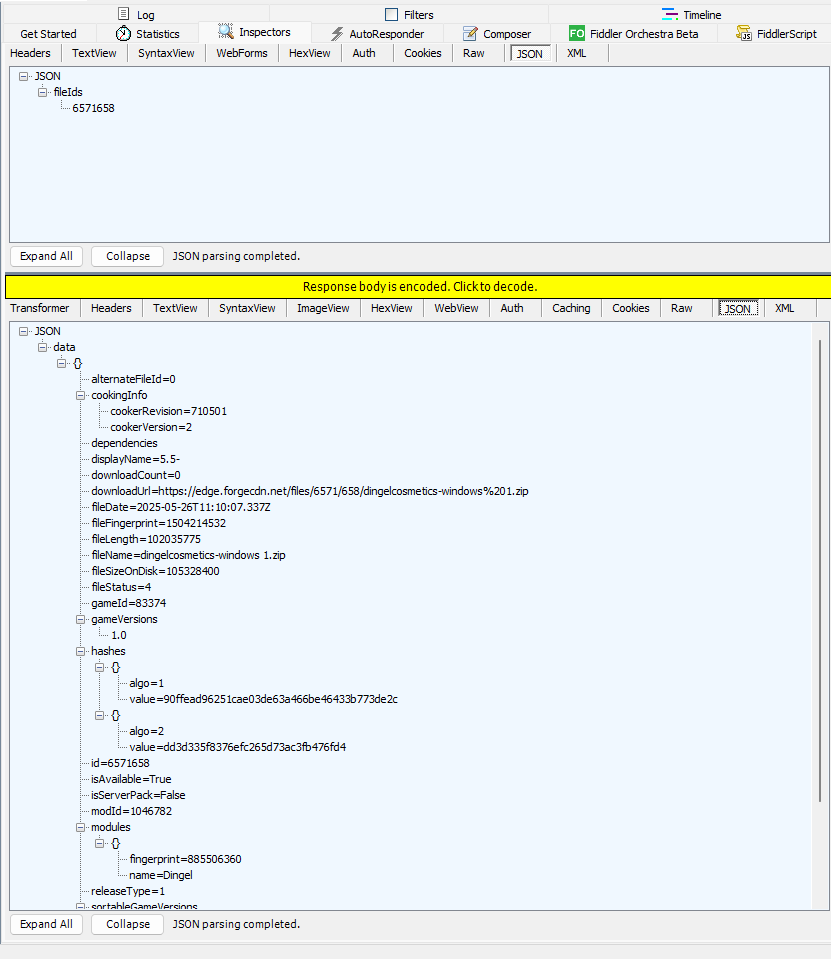
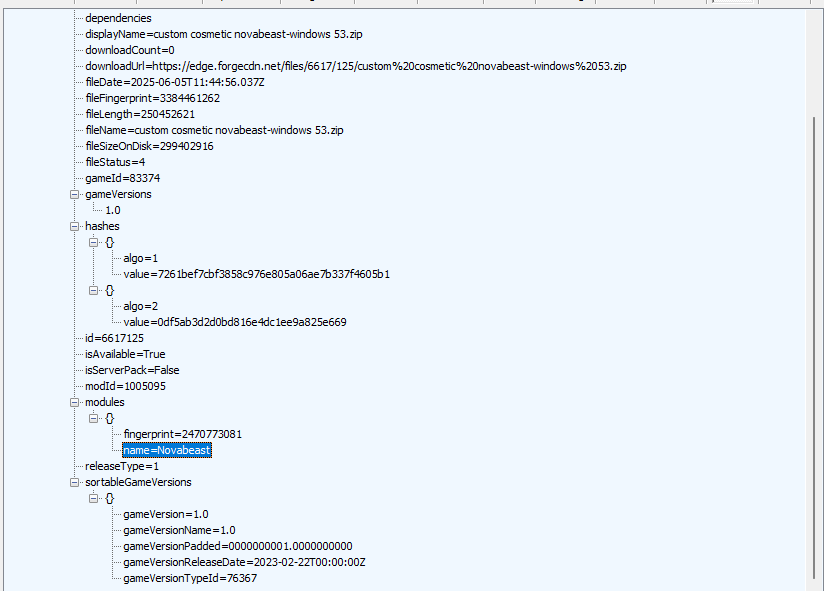
While loading into a server during my investigation, I observed the validation checks requesting information about verified mods and their attributes. These captures show the file metadata returned through that workflow, including file IDs, download URLs, availability, hashes, and module fingerprints.
Figure 1. A file-ID request and the returned mod attributes. The module fingerprint is 885506360, the original value used in the published PoC. Select the image to inspect it at full size.Figure 2. Another mod response, showing the Novabeast module and its own file attributes and fingerprint. These captures document the metadata I inspected; they do not alone demonstrate a successful bypass.
Testing my URL-matching expression
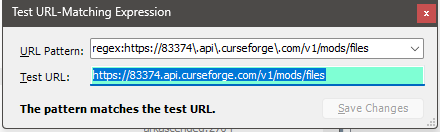
While developing the interception rules, I tested a regex-based URL pattern against the metadata endpoint:
https://83374.api.curseforge.com/v1/mods/files
The screenshot below records the matching tool reporting, “The pattern matches the test URL.” This helped me check that the rule recognized the endpoint I intended to target.
Figure 3. The URL-matching test recognizes the intended metadata endpoint. This development test is separate from the exact and substring comparisons used in the published C# PoC.
The problem I investigated
A mod fingerprint is a value used to identify or compare mod content. I investigated what happened when I changed that fingerprint in an API response before the game received it.
The security question was whether the client could be persuaded to treat modified content as acceptable by changing the metadata used during validation. Information processed on a player's computer can be manipulated, so an authoritative content restriction needs validation that does not depend solely on those client-side inputs.
What I built
I used C#, Titanium.Web.Proxy, Windows proxy configuration, HTTPS interception, and JSON response manipulation to build my research tool.
Established a local HTTPS proxy. I created a listener on the loopback address so traffic passed through a process on my own computer.
Enabled HTTPS inspection. I created and trusted a local root certificate through the proxy library. This allowed inspection for clients that used the proxy and accepted certificates issued by that authority.
Configured Windows traffic routing. I updated the current user's Windows Internet Settings and notified Windows that the proxy settings had changed.
Intercepted mod-metadata traffic. I attached request and response handlers that selected the relevant API calls.
Changed the validation input. I substituted a specific fingerprint in qualifying JSON responses before returning the response to the client.
Controlled HTTP responses. I set status codes and response headers for both blocked requests and rewritten JSON.
Game client -> Local C# HTTPS proxy -> API
Game client <- Modified metadata    <- API response
How my request handler worked
I matched one exact metadata URL and answered it locally with HTTP 403 Forbidden. I set the response's Content-Type header to text/html; charset=utf-8 and supplied a short HTML body.
This let me investigate how the validation workflow behaved when that request was blocked. The effect of request blocking needs to be distinguished from the effect of fingerprint substitution when reproducing the finding.
How my response handler worked
I selected GET requests whose URLs contained the configured API domain and /v1/mods/files path text. After checking that the response contained JSON, I read its decoded body and replaced the original fingerprint with a different fingerprint.
I then returned the rewritten body with HTTP 200 OK and a Content-Type of application/json; charset=utf-8. These were response headers; my implementation did not add authorization headers or replace API credentials. The proxy library handled the underlying HTTP exchange.
The exact replacement was "fingerprint":885506360 to "fingerprint":1925868458. It used literal text matching, so whitespace and formatting could affect whether the replacement occurred. A longer number beginning with the same digits could also be changed unintentionally.
Security impact and scope
My finding concerned the integrity of the mod-loading decision. Accepting unapproved client content in a restricted multiplayer environment undermines the intended content policy. That observation does not, by itself, establish server-side installation, remote code execution, or account compromise.
Installing a trusted local certificate and intercepting traffic does not establish a vulnerability in TLS. The issue I investigated was how the application used the altered metadata when deciding whether content was acceptable.
What I would recommend fixing
My remediation focus is authoritative validation: verify approved content against authenticated metadata and bind that metadata to the actual artifact. A fingerprint supplied through the same mutable channel as the validation input is not an independent authenticity check. Blocked requests, missing metadata, and inconsistent validation results also need explicit rejection behavior.
Skills demonstrated
C# development: asynchronous event handlers, HTTP processing, and native Windows API calls.
Windows configuration: registry-based proxy settings and certificate trust setup.
Application security: investigation of client-side trust assumptions and content-validation behavior.
Communication: technical documentation and responsible disclosure.
About my C# proof of concept
The C# example shows the local proxy, request blocking, and fingerprint-response manipulation used in my research.
The code below extracts the proxy functionality from my original loader. It includes the HTTPS listener, certificate setup, Windows proxy configuration, request interception, response headers, HTTP status handling, and fingerprint replacement.
My full loader also included KeyAuth licensing, subscription checks, updates, Steam-folder discovery, and background checks. I left those supporting features out of this public PoC to keep the security mechanism easy to follow.
This version uses one listener port and restores the previous proxy settings on normal exit. My original implementation tried two ports and disabled the proxy on exit. The request and response filters retain the original substring matching and replacement behavior.
Build requirements
The PoC requires Windows, a .NET SDK, and the Titanium.Web.Proxy NuGet package. Create a console project, replace its Program.cs with the accompanying source, and add the package:
dotnet new console -n ModIntegrityResearch
cd ModIntegrityResearch
# Replace Program.cs with FingerprintPoC.cs from this report.
dotnet add package Titanium.Web.Proxy
dotnet run
Certificate trust setup may require elevation. The PoC changes Windows proxy settings and installs a trusted local root certificate, so I would run it in an authorized test environment. Escape performs normal proxy cleanup. The certificate remains installed afterward, and forced termination can prevent proxy restoration.
Research scope and evidence notes
The accompanying C# implementation documents the proxy infrastructure and a related combination of exact-request blocking and fingerprint-response manipulation. It does not contain three separately identified connection-drop rules, so it should not be read as the complete reproduction of the three-check test described above.
Both bypasses described here have since been patched. This report preserves my original testing sequence; exact build numbers, patch dates, and the implementation of the second fix are not included.
This screenshot establishes a positive URL-match test. It does not, by itself, show an intercepted response or prove that the game accepted a mod. My published C# implementation uses an exact URL comparison in the request handler and substring checks in the response handler; it does not execute the regex shown in this separate development test. A successful match for one URL also does not establish that a pattern excludes unintended URLs.
My code does not replace mod download URLs or patch game memory. Some comments and console messages in my original loader referred to those actions, but the relevant executable logic performs request blocking and fingerprint substitution.
This published extraction has not been compiled or retested against a live game environment. Package compatibility and exact affected builds are not documented here. The bypasses have since been patched. The source demonstrates the manipulation technique; the complete finding also depends on the observed game behavior.
C# proof of concept
using System;
using System.Collections.Generic;
using System.Net;
using System.Runtime.InteropServices;
using System.Text;
using System.Threading.Tasks;
using Microsoft.Win32;
using Titanium.Web.Proxy;
using Titanium.Web.Proxy.EventArguments;
using Titanium.Web.Proxy.Models;

// Proxy-focused extraction of my original mod-loader research code.
// Requires Windows, a .NET SDK, and Titanium.Web.Proxy.
// Changes the current user's proxy and installs a trusted local root CA.
internal static class Program
{
    private const string OldFingerprint = "885506360";
    private const string NewFingerprint = "1925868458";
    private const string ApiDomain = "api.curseforge.com";
    private const string BlockedUrl = "https://83374.api.curseforge.com/v1/mods/files";
    private const string ProxyKey = @"Software\Microsoft\Windows\CurrentVersion\Internet Settings";
    private static readonly string[] Names = { "ProxyEnable", "ProxyServer", "ProxyOverride" };
    private static readonly Dictionary<string, (object Value, RegistryValueKind Kind)> Saved = new();

    [DllImport("wininet.dll", SetLastError = true)]
    private static extern bool InternetSetOption(IntPtr handle, int option, IntPtr buffer, int length);

    private static void Main()
    {
        var proxy = new ProxyServer();
        bool settingsSaved = false;
        proxy.BeforeRequest += OnBeforeRequest;
        proxy.BeforeResponse += OnBeforeResponse;
        try
        {
            // Inspect HTTPS for clients that use the proxy and trust this CA.
            proxy.CertificateManager.CreateRootCertificate(true);
            proxy.CertificateManager.TrustRootCertificate(true);
            var endpoint = new ExplicitProxyEndPoint(IPAddress.Loopback, 6969, true);
            proxy.AddEndPoint(endpoint);
            proxy.Start();
            SaveProxySettings();
            settingsSaved = true;
            EnableWindowsSystemProxy("127.0.0.1:6969");
            Console.WriteLine("Research proxy listening on 127.0.0.1:6969.");
            Console.WriteLine("Press Escape to stop and restore the previous proxy settings.");
            while (Console.ReadKey(intercept: true).Key != ConsoleKey.Escape) { }
        }
        finally
        {
            try { if (settingsSaved) RestoreProxySettings(); }
            finally
            {
                proxy.BeforeRequest -= OnBeforeRequest;
                proxy.BeforeResponse -= OnBeforeResponse;
                proxy.Stop();
            }
            // The trusted certificate remains installed. Forced termination
            // can bypass cleanup; use an authorized test environment.
        }
    }

    private static Task OnBeforeRequest(object sender, SessionEventArgs e)
    {
        string url = e.HttpClient.Request.RequestUri.AbsoluteUri;
        if (url.Equals(BlockedUrl, StringComparison.OrdinalIgnoreCase))
        {
            e.Ok("<html><body><h1>403 Forbidden: Blocked by research proxy</h1></body></html>");
            e.HttpClient.Response.StatusCode = 403;
            e.HttpClient.Response.Headers.RemoveHeader("Content-Type");
            e.HttpClient.Response.Headers.AddHeader("Content-Type", "text/html; charset=utf-8");
            Console.WriteLine("Blocked the exact metadata endpoint with HTTP 403.");
        }
        return Task.CompletedTask;
    }

    private static async Task OnBeforeResponse(object sender, SessionEventArgs e)
    {
        string url = e.HttpClient.Request.RequestUri.AbsoluteUri;
        // Preserve the original substring-based URL filtering.
        if (!url.Contains(ApiDomain) || !url.Contains("/v1/mods/files") ||
            !e.HttpClient.Request.Method.Equals("GET", StringComparison.OrdinalIgnoreCase))
            return;
        byte[] responseBytes = await e.GetResponseBody();
        if (responseBytes == null || responseBytes.Length == 0) return;
        string contentType = e.HttpClient.Response.ContentType ?? "";
        if (!contentType.Contains("application/json")) return;
        string originalJson = Encoding.UTF8.GetString(responseBytes);
        string patchedJson = originalJson.Replace(
            $"\"fingerprint\":{OldFingerprint}",
            $"\"fingerprint\":{NewFingerprint}");

        // Original status-code and response-header handling.
        e.HttpClient.Response.StatusCode = 200;
        e.HttpClient.Response.Headers.RemoveHeader("Content-Type");
        e.HttpClient.Response.Headers.AddHeader("Content-Type", "application/json; charset=utf-8");
        e.SetResponseBody(Encoding.UTF8.GetBytes(patchedJson));
        Console.WriteLine(originalJson == patchedJson
            ? "Eligible response: no matching fingerprint found."
            : "Replaced the fingerprint in an intercepted JSON response.");
    }

    private static void SaveProxySettings()
    {
        using var key = Registry.CurrentUser.OpenSubKey(ProxyKey)
            ?? throw new InvalidOperationException("Windows Internet Settings key is unavailable.");
        foreach (string name in Names)
        {
            object value = key.GetValue(name);
            if (value != null) Saved[name] = (value, key.GetValueKind(name));
        }
    }

    private static void EnableWindowsSystemProxy(string address)
    {
        using var key = Registry.CurrentUser.OpenSubKey(ProxyKey, writable: true)
            ?? throw new InvalidOperationException("Cannot update Windows proxy settings.");
        key.SetValue("ProxyEnable", 1, RegistryValueKind.DWord);
        key.SetValue("ProxyServer", address, RegistryValueKind.String);
        key.SetValue("ProxyOverride",
            "steamcommunity.com;store.steampowered.com;*.steamcontent.com;*.valvesoftware.com;<local>",
            RegistryValueKind.String);
        RefreshProxySettings();
    }

    private static void RestoreProxySettings()
    {
        using var key = Registry.CurrentUser.OpenSubKey(ProxyKey, writable: true)
            ?? throw new InvalidOperationException("Cannot restore Windows proxy settings.");
        foreach (string name in Names)
        {
            if (Saved.TryGetValue(name, out var saved)) key.SetValue(name, saved.Value, saved.Kind);
            else key.DeleteValue(name, throwOnMissingValue: false);
        }
        RefreshProxySettings();
    }

    private static void RefreshProxySettings()
    {
        InternetSetOption(IntPtr.Zero, 39, IntPtr.Zero, 0);
        InternetSetOption(IntPtr.Zero, 37, IntPtr.Zero, 0);
    }
}
Contact
Let’s talk.
For engineering opportunities and project conversations.